Use the packs in React Three Fiber
A small Vite project that puts a London street in a React Three Fiber canvas: the two buildings and six props from the free London Street Starter, a pub from the London pubs pack (£15), and a second pub made by that pack's generator. The listings below are the files we ran to make this picture.
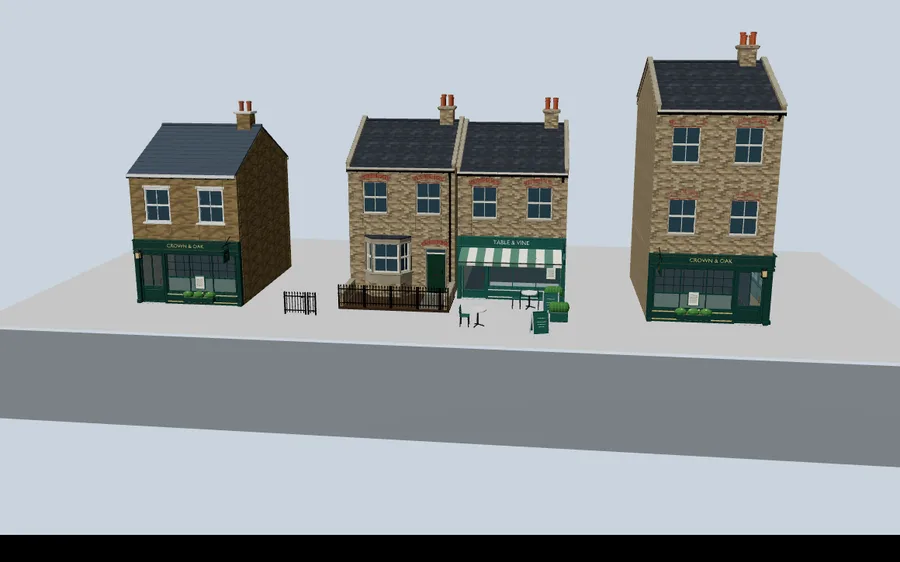
Download the starter (zip, code only)
Tested with three.js 0.186.1, React 19.3, @react-three/fiber 9.8, @react-three/drei 10.7 and Vite 7. The zip has no model files: those come from the packs, under their licence.
1. Set up
- Unzip the starter and run
npm install. - Unzip the free pack so
buildings/,props/andground/sit inpublic/free/.npm run devnow shows the street. - Optional, for a paid pack: copy its
assemblies.jsandjstov-kit.jsintosrc/kit/, and itsassemblies/,models/andmanifests/intopublic/packs/<pack>/.
2. The free buildings: plain useGLTF
The free pack's buildings are already assembled into one GLB per detail level, so drei's useGLTF loads them directly. It also registers the meshopt decoder that the compressed files need. Each building is measured once with a Box3 and moved so its front stands on z = 0.
// The free London Street Starter: two buildings flattened into one GLB per detail
// level, six props and a street surface. Unzip it into public/free/.
// drei's useGLTF sets up the meshopt decoder the files need.
import { useMemo } from 'react';
import { useGLTF } from '@react-three/drei';
import { Box3 } from 'three';

// Widths from the pack's catalogue.json (metres). The row is centred on x = 0 with
// the shop fronts on z = 0; props sit relative to the front-centre of a building.
const BUILDINGS = [
  { id: 'london-residential-benchmark', width: 5.12 },
  { id: 'london-shopfronts-restaurant', width: 5.1 },
];
const PROPS = [
  { id: 'london-residential-gate-spear', near: 0, at: [-4.2, 0.9] },
  { id: 'london-residential-railing-spear-short', near: 0, at: [-3.45, 0.9] },
  { id: 'london-shopfronts-cafe-table', near: 1, at: [-1.2, 1.6] },
  { id: 'london-shopfronts-cafe-chair', near: 1, at: [-1.75, 1.6], rotY: Math.PI / 2 },
  { id: 'london-shopfronts-a-board', near: 1, at: [1.4, 2.4], rotY: 0.3 },
  { id: 'london-shopfronts-planter-box', near: 1, at: [2.2, 0.5] },
];
const total = BUILDINGS.reduce((w, b) => w + b.width, 0);
const lefts = BUILDINGS.map((_, i) => -total / 2 + BUILDINGS.slice(0, i).reduce((w, b) => w + b.width, 0));
const fronts = BUILDINGS.map((b, i) => lefts[i] + b.width / 2);

function Glb({ url, ...props }) {
  const { scene } = useGLTF(url);
  const object = useMemo(() => scene.clone(), [scene]); // a clone, so a GLB can appear twice
  return <primitive object={object} {...props} />;
}

/** A building with its left edge at `left`, standing on y = 0, front face on z = 0. */
function Building({ url, left }) {
  const { scene } = useGLTF(url);
  const [object, offset] = useMemo(() => {
    const o = scene.clone(); const b = new Box3().setFromObject(o);
    return [o, [left - b.min.x, -b.min.y, -b.max.z]];
  }, [scene, left]);
  return <primitive object={object} position={offset} />;
}

export function FreeStreet({ level = 'medium' }) {
  return (
    <group>
      <Glb url="/free/ground/street-ground.glb" />
      {BUILDINGS.map((b, i) => <Building key={b.id} url={`/free/buildings/${b.id}/${level}-${b.id}.glb`} left={lefts[i]} />)}
      {PROPS.map(p => <Glb key={p.id} url={`/free/props/${p.id}/${level}-${p.id}.glb`} position={[fronts[p.near] + p.at[0], 0, p.at[1]]} rotation={[0, p.rotY ?? 0, 0]} />)}
    </group>
  );
}
3. A paid pack: its own runtime, inside your bundle
Pack assemblies keep each part separate, with its own colourway, weathering and moving parts, so they load through jstov-kit.js, the runtime in the zip, rather than through useGLTF. Put that file in src/, not public/: Vite then bundles it with the same copy of three.js that React Three Fiber uses. Two copies of three in one page give you objects that will not render together.
import { defineConfig } from 'vite';
import react from '@vitejs/plugin-react';

// dedupe: the pack runtime (src/kit/jstov-kit.js) imports `three` itself, and it must be
// the SAME copy React Three Fiber uses, or materials and objects will not mix.
export default defineConfig({ plugins: [react()], resolve: { dedupe: ['three'] } });
The component loads an assembly by id, or asks the pack's generator for a new layout, and hands the result to React Three Fiber as a <primitive>. Changing its props loads the new version.
// Any paid pack (format 2): load one of its assemblies, or a layout from its generator,
// with the runtime the pack ships. Copy the pack's assemblies.js and jstov-kit.js into
// src/kit/ (so Vite bundles them with the same three.js as React Three Fiber) and the
// rest of the unzipped pack into public/packs/<pack>/.
import { useEffect, useState } from 'react';

// Optional import: the starter still runs without a paid pack.
const kits = import.meta.glob('./kit/assemblies.js');
export const hasPack = Object.keys(kits).length > 0;
const kit = () => kits['./kit/assemblies.js']();

/**
 * @param pack     folder under public/packs/, e.g. "london-pubs"
 * @param id       an assembly in that pack (assemblies/<id>.json), or omit and pass `generate`
 * @param generate options for the pack's generator, e.g. { seed: 3 }
 * @param level    'high' | 'medium' | 'low'
 */
/** Kit glass uses physical transmission, which makes three.js draw the whole scene twice
 *  per frame. At window scale plain transparency looks the same. */
function flattenGlass(root) {
  root.traverse(o => {
    if (!o.isMesh) return;
    for (const m of [].concat(o.material)) if (m.transmission > 0) Object.assign(m, { transmission: 0, transparent: true, opacity: Math.min(m.opacity, 0.38), depthWrite: false, needsUpdate: true });
  });
}

export function PackAssembly({ pack, id, generate, level = 'medium', ...props }) {
  const [object, setObject] = useState(null);
  const key = JSON.stringify([pack, id, generate, level]);
  useEffect(() => {
    if (!hasPack) return;
    let live = true; let made = null;
    (async () => {
      const { loadAssembly, loadGenerated, GENERATOR } = await kit();
      const base = `/packs/${pack}`; // where the pack's models/ and manifests/ are served
      made = id
        ? await loadAssembly(`${base}/assemblies/${id}.json`, { level, base })
        : await loadGenerated(GENERATOR(generate ?? {}), { level, base });
      flattenGlass(made);
      if (live) setObject(made);
    })().catch(err => console.error(`PackAssembly ${pack}/${id ?? 'generator'}:`, err));
    return () => { live = false; };
  }, [key]); // eslint-disable-line react-hooks/exhaustive-deps
  return object ? <primitive object={object} {...props} /> : null;
}
4. Putting it together
import { Suspense, useState } from 'react';
import { Canvas } from '@react-three/fiber';
import { OrbitControls } from '@react-three/drei';
import { FreeStreet } from './FreeStreet.jsx';
import { PackAssembly, hasPack } from './PackAssembly.jsx';

// Which pack you copied in (see README). These ids are from London pubs; any pack works.
const PACK = 'london-pubs';
const PUBS = ['london-pubs-corner', 'london-pubs-neighbourhood', 'london-pubs-wide'];

export default function App() {
  const [level, setLevel] = useState('medium');
  const [pub, setPub] = useState(PUBS[0]);
  const [seed, setSeed] = useState(1);
  return (
    <>
      <Canvas camera={{ position: [4, 11, 34], fov: 42 }} dpr={[1, 1.5]} frameloop="demand">
        <color attach="background" args={['#c9d3dc']} />
        <hemisphereLight args={['#dfe8f2', '#6b6458', 1.4]} />
        <directionalLight position={[-12, 22, 18]} intensity={2.2} />
        <Suspense fallback={null}>
          <FreeStreet level={level} />
        </Suspense>
        {hasPack && <>
          {/* An assembly from the pack, next to the free buildings */}
          <PackAssembly pack={PACK} id={pub} level={level} position={[11, 0, 0]} />
          {/* A layout from the pack's generator: change the options, get a new building */}
          <PackAssembly pack={PACK} generate={{ seed }} level={level} position={[-12, 0, 0]} />
        </>}
        <OrbitControls target={[0, 4, 0]} makeDefault />
      </Canvas>
      <div style={{ position: 'absolute', top: 12, left: 12, background: '#fff', padding: '8px 12px', borderRadius: 8, display: 'flex', gap: 10, alignItems: 'center', flexWrap: 'wrap' }}>
        <label>Detail <select value={level} onChange={e => setLevel(e.target.value)}><option>high</option><option>medium</option><option>low</option></select></label>
        {hasPack ? <>
          <label>Pub <select value={pub} onChange={e => setPub(e.target.value)}>{PUBS.map(p => <option key={p}>{p}</option>)}</select></label>
          <button onClick={() => setSeed(s => s + 1)}>Generate another (seed {seed})</button>
        </> : <span>Free starter only: copy a pack into src/kit and public/packs to add assemblies (see README).</span>}
      </div>
    </>
  );
}
Performance notes
frameloop="demand"means a still street is not redrawn 60 times a second. Orbiting still draws normally.- Kit glass uses physical transmission. One visible transmissive material makes three.js render the whole scene twice per frame, so the component swaps it for plain transparency, which looks the same at window scale.
- Every part of an assembly is its own mesh, so a pub costs tens of draw calls. The benchmarks list what each finished scene costs and what to do about it.
Going further
- Swap in any pack: change
PACKand the assembly ids inApp.jsx. The ids are the file names in the pack'sassemblies/folder, and each pack page lists its generator options. - See the same parts in the street builder, which runs this runtime in plain three.js.
- Plain three.js instead of React: build a London terrace.