Colourways and materials in three.js
Every part in the London terraced houses pack has named material slots: surface-london-stock for the brick, trim-stone for sills and lintels, surface-door, surface-glass and so on. An assembly can give each slot a look, and the kit runtime in the pack (jstov-kit.js, loaded for you by assemblies.js) builds the material. That is all a colourway is. The code below is the code we ran to make the picture.
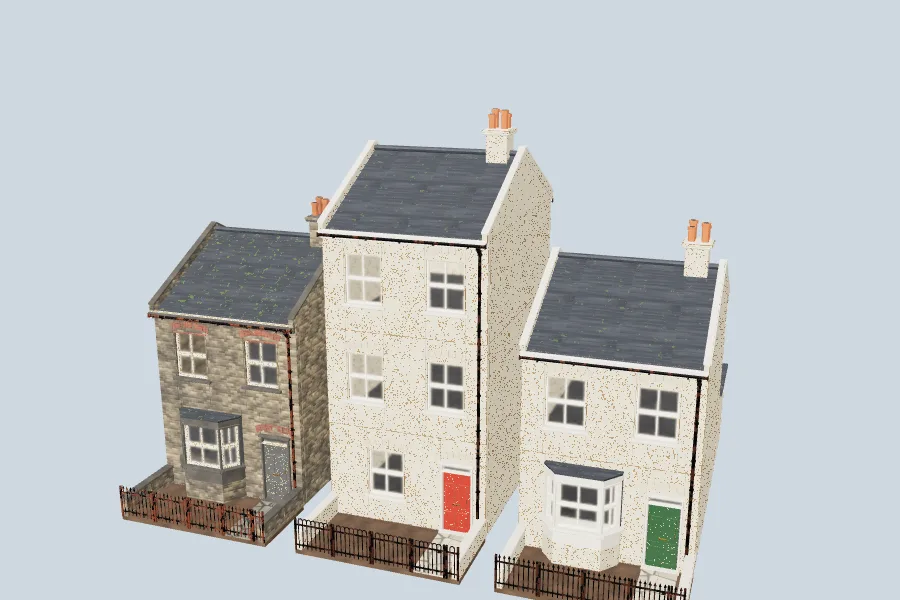
Left: the shipped soot-blackened colourway. Middle: the three-storey house, which the pack ships in plain brick, in the stucco colourway. Right: the two-storey house in stucco with the doors repainted green.
The code
Unzip the pack next to your script. It needs the same import map for three as the pack's index.html.
// Tutorial example: colourways and your own materials on London terraced houses.
// Assumes the pack is unzipped next to this file (assemblies/, assemblies.js, jstov-kit.js).
import { loadAssembly, loadGenerated } from './assemblies.js';

const json = (url) => fetch(url).then((r) => r.json());
const eachPart = (node, fn) => { if (node.asset) fn(node); (node.children ?? []).forEach((c) => eachPart(c, fn)); };

// 1. A colourway ships as its own assembly: load it like any other.
export const sootHouse = (level = 'medium') =>
  loadAssembly('assemblies/london-residential-colourway-soot.json', { level });

// 2. A colourway is a material slot -> look map stored on each part. Read it once…
export async function colourway(url) {
  const looks = {};
  eachPart((await json(url)).root, (part) => Object.assign(looks, part.materials));
  return looks; // e.g. { 'surface-london-stock': 'london-stock-soot', 'trim-stone': 'stone-soot-darkened', … }
}

// …and lay it over any other house. A part only uses the slots its model has.
export async function recoloured(houseUrl, looks, level = 'medium') {
  const house = await json(houseUrl);
  eachPart(house.root, (part) => { part.materials = { ...part.materials, ...looks }; });
  return loadGenerated(house, { level });
}

// 3. Your own look: a look name or a layered spec, base/finish + age layers # tint.
export const greenDoors = { 'surface-door': 'paint-cream/gloss+chips:0.1+grime:0.2#2f5a3c' };
Then:
const stucco = await colourway('assemblies/london-residential-colourway-stucco.json');
scene.add(await sootHouse());
scene.add(await recoloured('assemblies/london-residential-three-storey.json', stucco));
scene.add(await recoloured('assemblies/london-residential-benchmark.json', { ...stucco, ...greenDoors }));
How it works
- A colourway is 13 slot → look pairs. The stucco colourway, for example, sets
surface-london-stockto a cream painted plaster andtrim-stonetolimestone-carved-pale. The pack's three colourways (soot-blackened, yellow stock, painted stucco) each give every slot one look, so reading them off the assembly is exact. - It works on any house type.
recolouredadds the same map to every part; each part uses only the slots its model actually has, so walls take the brick, windows take the glass and timber, and nothing else changes. - Looks are names or specs. The runtime knows 268 named looks (
lookNames, exported fromassemblies.js). A spec builds one: a base, an optional finish, age layers with amounts, and a tint, as in'paint-cream/gloss+chips:0.1+grime:0.2#2f5a3c'. Check one withvalidateMaterialSpec(spec), which returns a list of problems (empty when it is valid). - Weathering is part of the look. Soot, damp, moss, chips and grime are age layers, generated in the browser rather than downloaded, and fitted to each part's size. That is why you should not merge parts across buildings: instance them instead (see cut draw calls with InstancedMesh).
Going further
- To recolour a single house in a row, change the
materialson that house's parts only; the assembly JSON gives every part anidsuch ashouse-0-front-door. - Colourways do not care which pack a part comes from: the same slot names run through the shopfronts and pubs upper floors.
- Try them without writing code in the street builder.