Build and animate a modular tower crane in three.js
The Tower cranes and lifting pack ships a tower crane as separate parts rather than one mesh. That means you choose its height, and the slewing head, trolley and hook can move. This guide assembles one in code; it is the code that drew the crane in the picture.
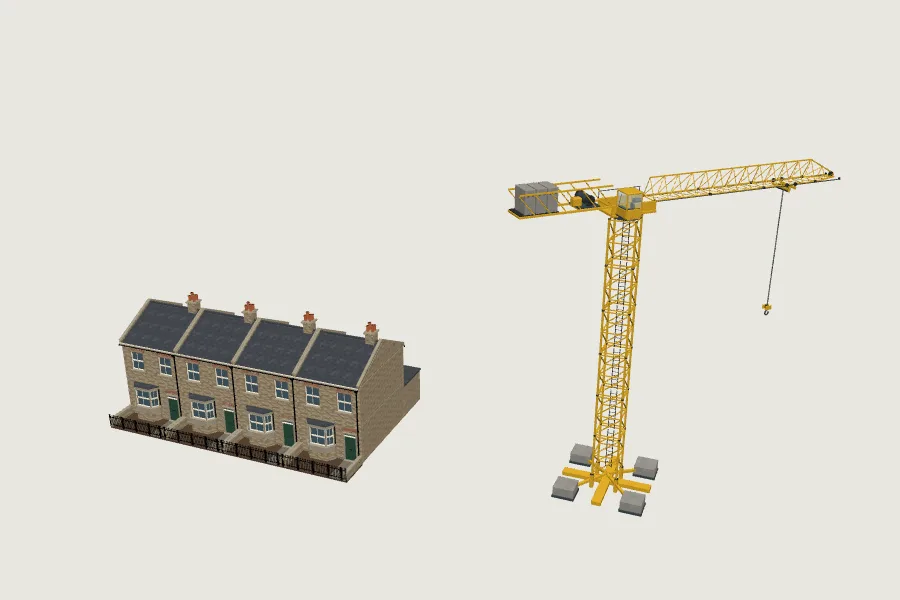
The parts and how they fit
- Tower base on the ground, then tower masts, each 3 m tall; the first sits 1 m up on the base, so a crane with n sections tops out at 1 + 3n m.
- The tower slew on top of the mast. Everything above it goes in one group so it turns together.
- Tower jib sections every 4 m and a jib tip; the counter-jib and three ballast blocks balance them, 0.9 m and 1.02 m above the slewing head.
- The trolley runs along the jib; the hoist line is 3 m long and hangs from its top, so scaling it in y changes the drop, and the hook block hangs below it.
The code
Unzip the pack next to your script. Parts load from models/<id>/<level>-<id>.glb; the files are meshopt-compressed, so the loader needs three's MeshoptDecoder.
// Tutorial example: a tower crane built from the pack's separate parts, so it can
// be any height and its slew, trolley and hook can move in code.
import * as THREE from 'three';
import { GLTFLoader } from 'three/addons/loaders/GLTFLoader.js';
import { MeshoptDecoder } from 'three/addons/libs/meshopt_decoder.module.js';

const loader = new GLTFLoader().setMeshoptDecoder(MeshoptDecoder);
const cache = new Map();
const part = async (id, level = 'medium') => {
  const url = `models/${id}/${level}-${id}.glb`;
  if (!cache.has(url)) cache.set(url, loader.loadAsync(url).then(g => g.scene));
  return (await cache.get(url)).clone();
};
const P = 'construction-lifting-';

export async function towerCrane({ masts = 4, hookDrop = 3 } = {}) {
  const crane = new THREE.Group();
  crane.add(await part(P + 'tower-base'));
  for (let i = 0; i < masts; i++) {            // mast sections are 3 m, the first sits 1 m up on the base
    const m = await part(P + 'tower-mast'); m.position.y = 1 + i * 3; crane.add(m);
  }
  const slew = new THREE.Group();              // everything above the mast turns with the slewing head
  slew.position.y = 1 + masts * 3; crane.add(slew);
  slew.add(await part(P + 'tower-slew'));
  const counterjib = await part(P + 'tower-counterjib'); counterjib.position.set(-1.5, 0.9, 0); slew.add(counterjib);
  for (const x of [-5.35, -6.07, -6.79]) { const b = await part(P + 'tower-ballast'); b.position.set(x, 1.02, 0); slew.add(b); }
  for (const x of [1.5, 5.5, 9.5]) { const j = await part(P + 'tower-jib-section'); j.position.set(x, 0.9, 0); slew.add(j); }   // 4 m sections
  const tip = await part(P + 'tower-jib-tip'); tip.position.set(13.5, 0.9, 0); slew.add(tip);
  const trolley = new THREE.Group(); trolley.position.set(8.94, 0.9, 0); slew.add(trolley);
  trolley.add(await part(P + 'tower-trolley'));
  const line = await part(P + 'hoist-line');   // a 3 m rope hanging from its top: scale it to lengthen
  line.position.y = -0.5; line.scale.y = hookDrop / 3; trolley.add(line);
  const hook = await part(P + 'hook-block'); hook.position.y = -0.5 - hookDrop; trolley.add(hook);
  return { crane, slew, trolley, line, hook };
}

// Move it: turn the jib and run the trolley out and back along it.
export function animateCrane({ slew, trolley }, seconds) {
  slew.rotation.y = seconds * 0.15;
  trolley.position.x = 3 + 9 * (0.5 + 0.5 * Math.sin(seconds * 0.4));   // stays between the tower and the jib tip
}
Then const c = await towerCrane({ masts: 6, hookDrop: 8 }); scene.add(c.crane); and call animateCrane(c, clock.getElapsedTime()) each frame. In our test that crane stood 21.5 m tall with the hook 8 m under the trolley, and the animation carried the hook 7.9 m in five seconds.
Why the parts are separate
A crane that is one mesh can only be placed. Separate parts can be built to the height a scene needs, show a construction phase moving, or stand still at different angles across a skyline. The pack also includes a mobile crane, material hoist, concrete skip, lifting cage, pallet fork and slings in the same style, plus assembled versions of each rig.